FMP
How to Map Public Company Identifiers (CIK, ISIN, CUSIP) Using a Free API
Feb 10, 2026
Every publicly traded company can be identified in several ways - by its ticker symbol, but also by codes like CIK, ISIN, or CUSIP. If you're a developer or analyst working with financial data, you may encounter these identifiers in different datasets.
Mapping one identifier to another (for example, finding a stock's ticker symbol from its ISIN code) is a common challenge. In this article, we'll show how to reliably map company identifiers to tradable symbols step-by-step using free Financial Modeling Prep API endpoints. This not only streamlines your data pipeline but also extends your tool beyond a stock-only focus, allowing you to cross-reference global IDs without extra cost.
Why Do Companies Have Multiple IDs?
Public companies have different identifiers used for different purposes:
- Ticker Symbol: The short code used on stock exchanges to represent a company's shares (e.g. AAPL for Apple Inc.). This is what most stock APIs use to fetch data.
- CIK (Central Index Key): A unique 10-digit ID assigned by the SEC to entities that file reports (e.g. 0000320193 for Apple). It's used to track SEC filings and regulatory disclosures.
- ISIN (International Securities Identification Number): A 12-character alphanumeric code that uniquely identifies a security globally. For example, Apple's ISIN is US0378331005, which encodes its country (US) and other identifying info. ISINs are used worldwide to identify stocks, bonds, etc.
- CUSIP (Committee on Uniform Securities Identification Procedures): A 9-character code for North American securities. Apple's CUSIP is 037833100. CUSIPs are commonly seen in U.S. investment documents and are used for clearing and settlement.
Each serves a different system - trading, regulatory, or settlement. The trouble comes when you have one of these IDs but need another. For instance, an SEC dataset might give you only a CIK, but your pricing API needs the ticker symbol. Or a portfolio list might contain ISINs, but you need to fetch data by ticker. Identifier mismatches can halt your workflow.
The Challenge of Identifier Mismatches
Imagine you have a list of ISINs for international stocks, but your analysis tool only accepts tickers. Or you pulled SEC filings by CIK and now want the stock's latest price. These scenarios require mapping between identifiers. Doing it manually or maintaining mapping tables is tedious and error-prone - especially since companies can have multiple identifiers (one CIK can correspond to multiple tickers if a company has different share classes or listings).
|
Example mismatch scenarios:
|
In each case, a free lookup API can bridge the gap. Let's explore how to do this using Financial Modeling Prep's free API endpoints for CIK, ISIN, and CUSIP.
Signing up for a free Financial Modeling Prep API key only takes a minute: create a free account on their website, confirm your email, and your API key will be available in your dashboard immediately.
Mapping ISIN to Ticker Symbol (and Company)
ISIN is a global identifier, so being able to convert an ISIN to a ticker unlocks a lot of data. With the FMP ISIN lookup API, you can input an ISIN and retrieve details like the company name, stock symbol, and even market cap. This helps ensure you're targeting the right security across global markets.
|
Example: Say you have Apple's ISIN, US0378331005. You want to get Apple's ticker (NASDAQ: AAPL) and other info. The endpoint to use is: https://financialmodelingprep.com/stable/search-isin?isin=US0378331005&apikey=YOUR_API_KEY |
Replace YOUR_API_KEY with your key. If the ISIN is found, the API returns a JSON array of matching instruments. In this case, it should return data for Apple. For example:
JSON array of matching instruments
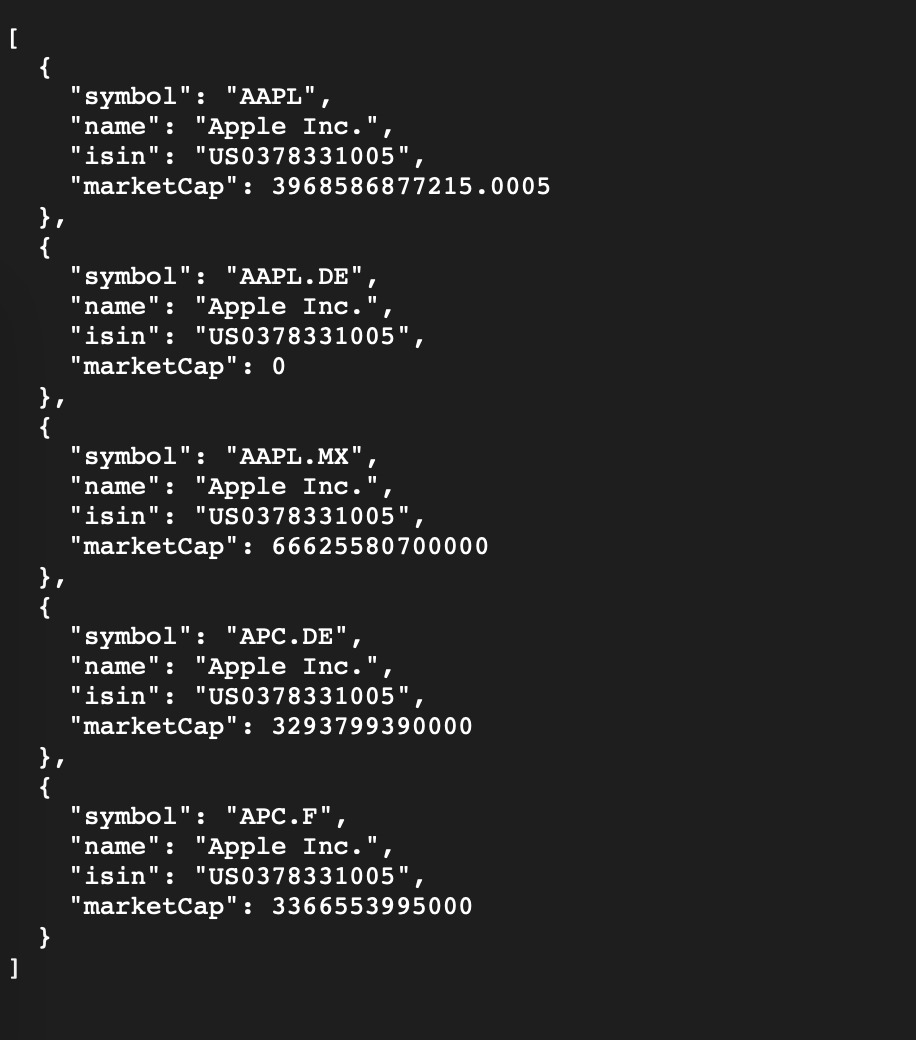
From this response, we see the ISIN corresponds to Apple Inc. (AAPL). We also get bonus information: Apple's market capitalization, which confirms we have the right company. We also see where else the stock is listed (5 different exchanges from the above example).
The key field for mapping is the "symbol": "AAPL" - now you can use that symbol to fetch stock prices, financials, or any other data in FMP.
How it works
Under the hood, the ISIN API performs a lookup in FMP's global securities database. ISINs are unique worldwide, so typically you'll get a single match for a given ISIN. (In rare cases of multiple share classes with one ISIN, you might see multiple results, but normally each class has its own ISIN.) The data returned includes the main identifiers and key stats, so you can immediately verify the mapping.
|
Expert Tip: You can integrate this into your code. For example, using JavaScript fetch: const isin = "US0378331005"; fetch(`https://financialmodelingprep.com/stable/search-isin?isin=US0378331005&apikey=YOUR_API_KEY`) .then(res => res.json()) .then(data => { const firstResult = data[0]; console.log(`ISIN ${isin} maps to ticker ${firstResult.symbol} (${firstResult.companyName}).`); }); |
This will output: “ISIN US0378331005 maps to ticker AAPL (Apple Inc.).” Now you have the ticker for downstream API calls or database joins.
Mapping CUSIP to Ticker Symbol (and Company)
A CUSIP is commonly seen in U.S. and Canadian markets. It's a 9-character code that, like an ISIN, identifies a specific security (often a stock or bond). Using FMP's CUSIP lookup API, you can convert a CUSIP to a ticker and company info.
|
Example: You have Apple's CUSIP, 037833100, but need the tradable symbol. The endpoint is: https://financialmodelingprep.com/stable/search-cusip?cusip=037833100&apikey=YOUR_API_KEY |
Calling this will return something like:
JSON array of matching instruments
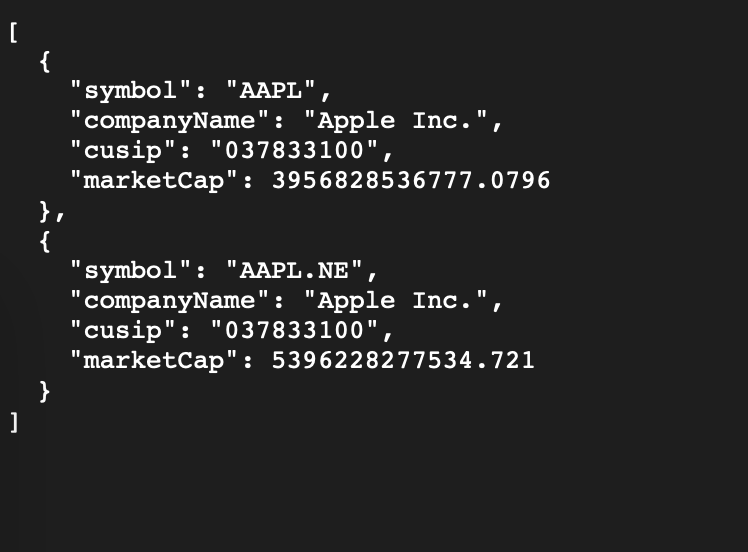
Again, we see CUSIP 037833100 → AAPL (Apple Inc.). The result mirrors what we got via ISIN, which is a good consistency check. We also get the ISIN in the data, since FMP often cross-references these identifiers for completeness.
|
Note: CUSIPs are unique to each security issuance. A single company (one CIK) might have multiple CUSIPs if it has different classes of stock or bonds. In most cases, when you search a common stock's CUSIP, you'll get that stock's ticker. If a company has two traded classes (e.g., Alphabet's GOOG and GOOGL), each class has its own CUSIP. You would need to use the specific CUSIP for the class you're interested in to get the corresponding ticker. |
Mapping CIK to Company Profile (and Ticker)
The CIK is different from ISIN/CUSIP in that it identifies a legal entity (the company) rather than a specific security. Nevertheless, you can map a CIK to the company's stock symbol using FMP's Company Profile by CIK API. This endpoint returns a full company profile.
|
Example: You have Apple's CIK, 320193 (usually written as 0000320193 with leading zeros). Use the endpoint: https://financialmodelingprep.com/stable/profile-cik?cik=320193&apikey=YOUR_API_KEY |
The JSON response will contain Apple's profile.
Apple's profile from the response
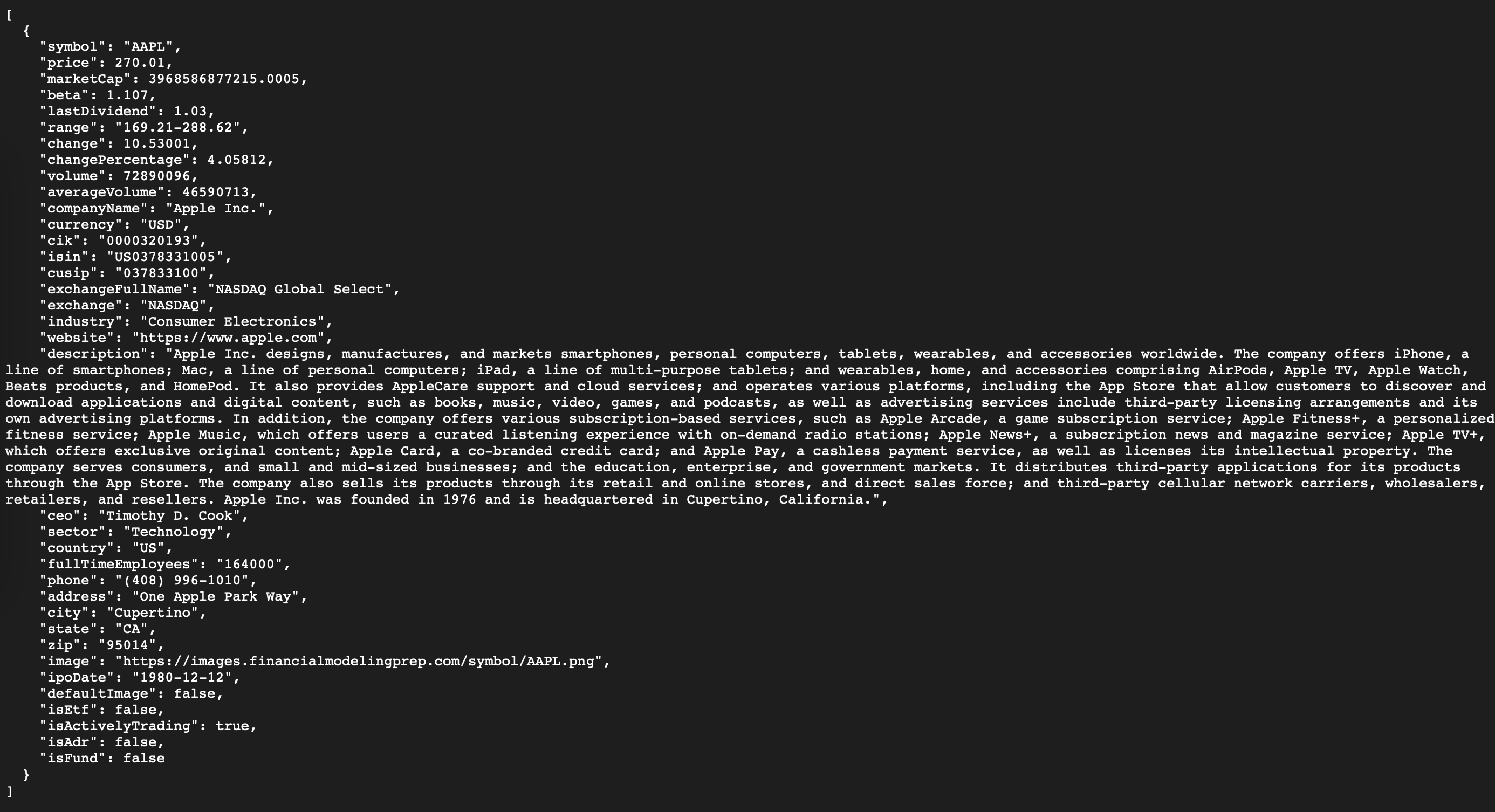
This not only gives us AAPL as the ticker for that CIK, but also a wealth of information: stock price, exchange, industry, CEO, and importantly the cross-IDs (CIK, ISIN, CUSIP all in one place). In fact, one of the profile's features is providing “key identifiers such as CIK, ISIN, and CUSIP to streamline cross-platform tracking”. It's a comprehensive one-stop lookup.
Handling multiple tickers
If a company has multiple ticker symbols (due to multiple share classes or listings), the profile-by-CIK typically returns the primary listing. For example, Alphabet Inc.'s CIK is the same for both GOOG and GOOGL; a profile lookup by that CIK may return just one of them (usually the class A shares). In cases like this, you should be aware that one CIK can map to more than one ticker. The API will usually give you the main common stock. If you need the others, you might have to search by those specific tickers or use other endpoints. However, for most use cases (where you just need “the company's stock”), the profile result will suffice.
When to use CIK lookup
This is especially handy for compliance or filing-related workflows. For instance, you might pull a list of companies from an SEC 13F filing and then use the profile-cik API to get each company's trading info for analysis. It's much faster than manually matching names to tickers, and it avoids errors because the lookup is exact by CIK.
Step-by-Step Identifier Mapping Workflow
To summarize the process, here's a quick step-by-step guide to map any of these identifiers to a ticker and company:
- Determine the identifier you have: Is it a CIK (numeric, up to 10 digits), an ISIN (12-character code often starting with country letters), or a CUSIP (9-character alphanumeric code)? Knowing this will direct you to the correct endpoint.
- Call the appropriate free API endpoint:
- For CIK: Use the profile lookup - profile-cik?cik=YOUR_CIK.
- For ISIN: Use the search - search/isin?isin=YOUR_ISIN.
- For CUSIP: Use the search - search-cusip?cusip=YOUR_CUSIP.
Remember to append your apikey query parameter. Each of these will return JSON data containing the mapped symbol and related info. - Extract the ticker symbol (and other needed data): Parse the JSON response to get the "symbol" field, which is the stock's ticker. Verify other fields like "companyName" to ensure it's the expected company.
- Use the ticker for further data queries: Now that you have the stock symbol, you can plug it into other API endpoints - for example, get real-time quotes, historical prices, financial statements, etc., using FMP's stock data APIs. The mapping step makes sure you're using the correct symbol recognized by those endpoints.
- Handle any special cases: In the rare case that an identifier returns multiple results (e.g., two companies share a similar ID or a company with multiple classes), handle accordingly - you might need to pick the correct one based on the company name or exchange. Generally, with CIK/ISIN/CUSIP this is uncommon, as these IDs are designed to be unique per security or entity.
Map Public Company Identifiers Using a Free API
Integrating free identifier lookup APIs into your toolkit can save you hours of manual cross-referencing. We've shown how to map CIK, ISIN, and CUSIP to actual tradable stock symbols using Financial Modeling Prep's free API endpoints. This approach ensures that no matter what identifier you start with, you can reliably get to the data that matters - like stock prices, profiles, and financials - in just one extra step.
A developer or analyst can confidently input a regulatory filing ID or a global security code and quickly retrieve the ticker and company details needed for analysis. The process is fast, systematic, and, importantly, cost-free up to generous limits (FMP's free plan offers a substantial number of calls daily, which is usually plenty for getting started).
Now, armed with knowledge and example code, you can enhance your applications to handle identifier mismatches gracefully. No more guessing which Apple is which in your datasets - the API will tell you. This means more time for analysis and development, and less time wrangling with data merges or hunting through reference tables.
FAQ
Can I map an identifier to a ticker without knowing the company name?
Yes. The CIK, ISIN, and CUSIP lookup endpoints work directly with the identifier itself, so you don't need the company name at all. As long as the identifier is valid, the API returns the corresponding ticker and company metadata automatically.
What happens if an identifier maps to multiple securities?
In rare cases, such as companies with multiple share classes or listings, an identifier search may return more than one result. When this happens, you should use fields like exchange, companyName, or symbol to select the correct security for your use case.
Is a CIK guaranteed to map to only one ticker?
No. A CIK identifies a legal entity, not a specific security, so one CIK can correspond to multiple tickers if the company has multiple share classes. The profile-by-CIK endpoint typically returns the primary or most common listing.
Are ISIN and CUSIP mappings reliable for international stocks?
ISINs are globally standardized and usually map cleanly to a single security, making them very reliable for international datasets. CUSIPs are primarily used in North America, so they are most reliable for U.S. and Canadian securities.
Can I use these lookup endpoints on the free FMP plan?
Yes. Financial Modeling Prep includes CIK, ISIN, and CUSIP lookup endpoints in its free tier, subject to daily request limits. For most development, testing, and small-scale analytics workflows, these limits are more than sufficient.
What's the best way to integrate identifier mapping into a data pipeline?
A common approach is to normalize all incoming identifiers by converting them to ticker symbols as an early pipeline step. Once everything is mapped to tickers, downstream processes like pricing, financial statements, and charting become much simpler and more consistent.