
FMP
How to Pull Cryptocurrency Prices Using a Free API
Feb 09, 2026
Digital asset markets are fragmented across hundreds of global exchanges, creating a chaotic data environment for analysts. Unlike equity markets that report to a consolidated tape, cryptocurrency liquidity is dispersed, often forcing developers to maintain multiple exchange connections to get a complete picture. This manual approach is fragile, maintenance-heavy, and difficult to scale.
Using FMP's free plan to access the Cryptocurrency List API offers a standardized way to bypass this complexity. It centralizes the data into a normalized stream, allowing you to access clean pricing for thousands of assets without managing individual exchange integrations. This method is designed for rapid validation, enabling you to test the data structure and reliability before committing to a complex production environment.
Getting Started: Obtaining Your Free API Key
Before you can pull leadership data programmatically, you need to establish a connection. This requires an API key, which acts as your unique digital ID for making requests.
Getting set up is straightforward:
- Navigate to the Financial Modeling Prep pricing page.
- Locate the "Free" plan option and click "Get my free API key."
- Enter your email to start the registration process—no credit card is required.
- Once verified, your unique API key will be displayed on your dashboard.
This key allows you to make immediate calls to the API. For a more detailed walkthrough on setting up your environment, you can refer to this guide on how to sign up and use a free stock market data API.
Mapping the Market with a Standardized Asset List
The first technical hurdle in crypto data analysis is ticker standardization. Because symbols can vary between exchanges, Bitcoin might appear as BTC on one and XBT on another—relying on a static list often leads to errors. You need a dynamic master directory to ensure your requests target the correct asset.
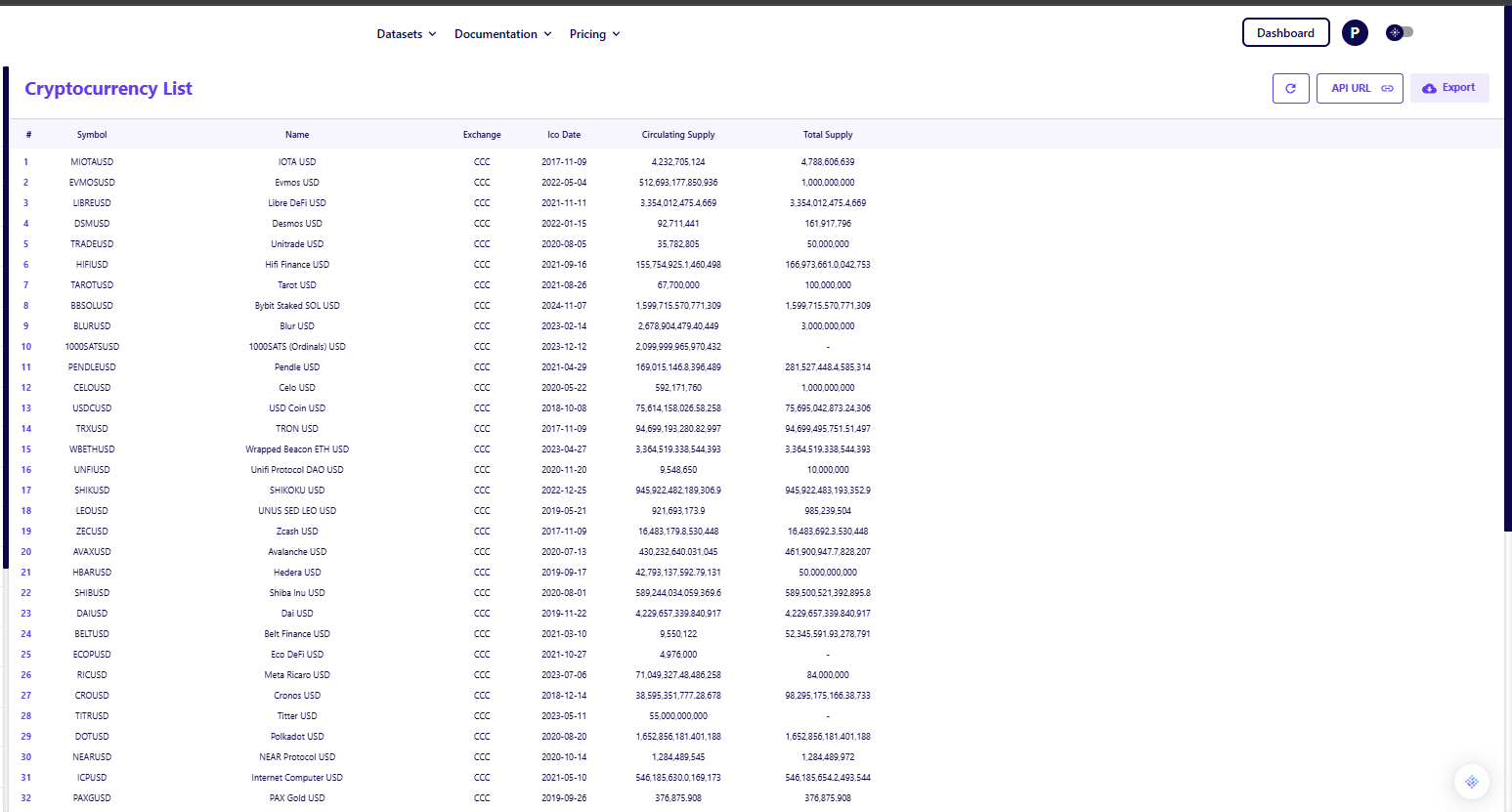
The Cryptocurrency List API functions as this inventory tool. By calling this endpoint, you receive a complete index of all tradable assets supported by the platform, which ensures your downstream queries are valid.
Why You Need a Dynamic Directory
- Standardized Symbols: The output provides the exact symbol required for price queries, such as MIOTAUSD or ETHUSD, reducing the risk of null responses.
- Asset Metadata: It returns essential context beyond just the name, including the exchange source (often denoted as CCC for aggregated feeds) and supply figures like Circulating Supply and Total Supply.
- Filtering Inactive Tokens: This context helps you filter out inactive or low-quality tokens before you begin pulling price data, saving API calls for relevant assets.
Retrieving Real-Time Price and Volume Data
Once you have identified your target assets, the next step is to retrieve current market data. The Cryptocurrency Quote API is the primary endpoint for this, delivering a precise snapshot of market activity at the moment of the request.
Core Metrics for Analysis
When you query a specific pair like BTCUSD, the API returns a flattened JSON object containing the core metrics needed for analysis or dashboarding.
- Intraday Performance: The response includes the current Price, Open, and Previous Close, allowing you to immediately calculate daily percentage changes.
- Liquidity Verification: Fields like Volume and Market Cap allow you to verify liquidity, distinguishing between major assets and thinly traded pairs that might distort your model.
- Technical Context: The feed often includes pre-calculated technicals like the 50-day and 200-day averages, enabling trend analysis without the need to store months of historical data locally.

Optimizing for Speed and Scale
As your application grows, querying individual quotes for hundreds of assets can become inefficient. To handle different load requirements, you can switch to endpoints designed for specific bandwidth needs.
Reducing Latency with Short Quotes
For applications where speed is critical and you only need the "headline" numbers, the Cryptocurrency Quote Short API provides a streamlined payload.
- Reduced Payload: This endpoint strips away metadata and technical averages, returning only the Price, Change, and Volume. This is ideal for mobile apps or ticker widgets where bandwidth is a constraint.
- Faster Parsing: With fewer fields to process, your script can handle high-frequency updates more efficiently.
Bulk Retrieval for Market Screening
Conversely, if you need to scan the entire market to find movers, sending thousands of individual requests is impractical. The All Cryptocurrency Quotes API allows you to pull the entire market state in a single request.
- Batch Retrieval: This endpoint returns an array of quotes for every active cryptocurrency, significantly reducing HTTP overhead compared to looping through individual symbols.
- Market Screening: This is the preferred method for building "top gainers" lists or filtering the market for assets that meet specific volume criteria.
Validating Data Accuracy and Latency
Trusting a new data source requires verification. In a self-serve environment, you should validate the API output by comparing it against a known benchmark before integrating it into your workflow. This "sanity check" confirms that the data is both fresh and reflective of the broader market.
Steps to Verify Data Integrity
- Timestamp Verification: Check the Timestamp field in the response to ensure the data is current and not a cached response from a previous session.
- Cross-Reference Pricing: Compare the price returned by the API against a major exchange like Coinbase. While small deviations are expected due to the nature of real-time vs. historical data sets, the figures should align directionally.
- Naming Consistency: Ensure the API's naming convention matches your internal database to prevent mapping errors (e.g., confusing USD Coin with US Dollar).
Integrating Data into Your Workflow
The value of this data is not in the JSON itself, but in how it fits into your existing tools. You do not need to build a complex software stack to start using these feeds.
- Spreadsheet Integration: If you are an analyst working in Excel or Google Sheets, you can pull this data directly into your models without writing code. This allows for live price updates in your valuation sheets or portfolio trackers.
- Scripted Automation: For those building automated alerts, a simple Python script can loop through the bulk endpoint to flag significant price moves or volume spikes.
For a deeper dive on how to connect these endpoints to your daily tools, read more about how Financial Modeling Prep fits into existing research workflows without replacing them.
Moving from Manual to Automated Tracking
Adopting a free API allows you to professionalize your data gathering without financial risk. By normalizing the fragmented crypto market into a standard request-response cycle, you gain the ability to focus on analysis rather than data cleaning.
Once you have established a reliable pipeline using the specific or bulk endpoints, scaling to cover the broader market becomes a matter of looping your logic. If you are navigating API keys and request limits for the first time, reviewing the basics of how to sign up and use a free stock market data API can provide helpful parallels for managing your setup effectively.
Frequently Asked Questions
Do I need to provide a credit card to use the free crypto API?
No, the free tier is typically accessible with just a valid email address. It is designed to allow users to test the data structure and connectivity without any upfront payment or billing information.
What is the difference between the List API and the Quote API?
The List API acts as a directory, providing a static list of all supported symbols and their metadata. The Quote API is dynamic, providing the actual changing price, volume, and trading data for those symbols.
Can I use this data for real-time trading?
While the data is sufficient for trend analysis, backtesting, and general monitoring, high-frequency trading usually requires a specialized, low-latency WebSocket connection rather than a standard REST API.
What format does the data come in?
The data is delivered in JSON format. This is the industry standard for web APIs because it is lightweight, human-readable, and easily parsed by virtually every modern programming language, including Python and JavaScript.
How many assets can I track at once?
You can query individual assets or pull a list of quotes. However, free tiers usually have a limit on the number of requests you can make per minute (rate limit). It is best to batch your requests using the "All Quotes" endpoint to stay within these limits.
Is the price data the same as what I see on an exchange?
Not exactly. The API typically provides a "composite" or aggregated price derived from multiple liquidity sources. This ensures the price reflects the broader market rather than the idiosyncrasies of a single exchange.
What happens if I exceed my request limit?
If your script makes too many calls in a short period, the API will return a "429 Too Many Requests" error. To fix this, you can add a simple time delay between your requests or upgrade to a tier with higher throughput.

Top 5 Defense Stocks to Watch during a Geopolitical Tension
In times of rising geopolitical tension or outright conflict, defense stocks often outperform the broader market as gove...
Circle-Coinbase Partnership in Focus as USDC Drives Revenue Surge
As Circle Internet (NYSE:CRCL) gains attention following its recent public listing, investors are increasingly scrutiniz...

LVMH Moët Hennessy Louis Vuitton (OTC:LVMUY) Financial Performance Analysis
LVMH Moët Hennessy Louis Vuitton (OTC:LVMUY) is a global leader in luxury goods, offering high-quality products across f...