
FMP
How to Track Executive Teams and Leadership Changes with a Free API
Feb 09, 2026
Management quality is often the invisible variable in valuation models. While financial statements follow strict GAAP or IFRS standards, data regarding executive teams—tenure, compensation, and composition—is frequently buried in unstructured proxy statements and 10-K filings. For analysts, manually extracting this information to monitor C-suite turnover or governance risks is time-consuming and prone to entry errors.
Accessing this information through a free Financial Modeling Prep API changes the workflow from manual extraction to automated monitoring. It allows you to pull standardized rosters for thousands of companies instantly, providing a structured view of the people controlling capital allocation. This approach enables you to validate leadership data quickly and set up alerts for significant personnel shifts without parsing hundreds of PDF documents.
Getting Started: Obtaining Your Free API Key
Before you can pull leadership data programmatically, you need to establish a connection. This requires an API key, which acts as your unique digital ID for making requests.
Getting set up is straightforward and uses the documentation page directly:
- Navigate to the Financial Modeling Prep documentation page.
- Scroll down to the sign-up box and insert your email to start the registration process.
- Verify your email to create your account and generate your unique API key.
- Once verified, you can view your key and usage details on your dashboard.
This key allows you to make immediate calls to the API. For a more detailed walkthrough on setting up your environment, you can refer to this guide on how to sign up and use a free stock market data API.
Accessing Standardized Leadership Data
The primary challenge in analyzing governance is normalization. One filing might list a "Chief Financial Officer" while another uses "CFO" or "EVP Finance." The Company Executives API solves this by returning a structured list of key personnel, normalizing titles and names into a queryable format.
Normalizing Corporate Hierarchies
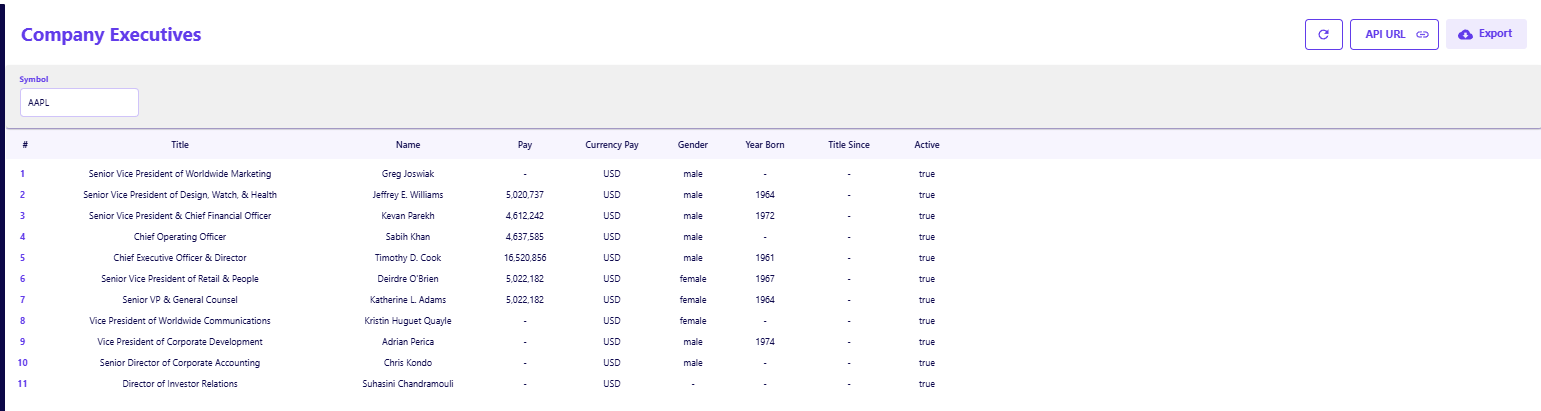
When you call this endpoint for a major capitalization like Apple (AAPL), you receive a clean JSON output detailing the entire leadership layer.
- Role Clarity: The response clearly distinguishes between operational roles, such as "Chief Operating Officer," and strategic oversight roles like "Director," ensuring you map the right people to the right responsibilities.
- Demographic Details: The dataset includes fields for Gender and Year Born, which are essential for analyzing board diversity or estimating retirement risks for key figures like the CEO.
- Active Status: A boolean Active flag (e.g., true) confirms that the executive is currently seated, allowing you to filter out past employees without cross-referencing news reports.
Validating Compensation and Incentives
Beyond just listing names, understanding how management is incentivized is critical for alignment analysis. The API provides direct access to compensation figures, allowing you to sanity-check proxy statement data or compare pay across peer groups.
Auditing Executive Pay Structures
The output explicitly lists the Pay and Currency Pay, providing a raw integer that can be immediately used in financial models.
- Compensation Analysis: You can see precise figures, such as 16,520,856 for a CEO or 5,022,182 for a General Counsel, which helps in calculating the ratio of executive pay to net income or median employee salary.
- Currency Standardization: The Currency Pay field (e.g., USD) ensures that you are comparing apples to apples when analyzing multinational corporations where executives might be paid in local currencies.
Integrating Governance Data into Watchlists
The real value of programmatic access lies in its ability to scale. Instead of checking a single company's Investor Relations page, you can loop this request across a watchlist of 50 or 100 tickers to audit leadership stability.
Adding to a Current Workflow
If you already work in spreadsheets, you do not need to build a new system to use this data. You can integrate API calls directly into your existing models using add-ons. This allows you to refresh executive rosters alongside your financial statements without leaving the application.
- For Excel Users: You can stream live data directly into cells without using complex macros. This is ideal for maintaining a "live" cover sheet for your valuation models that flags if a key executive has left. Learn more about streaming live stock data into Excel.
- For Google Sheets Users: The integration supports formula-driven pulls, allowing you to fetch specific data points like CEO pay or board composition directly into your cloud-based sheets. This is particularly useful for collaborative teams sharing research. Explore the best Google Sheets software for stock analysis.
If you are just starting to build these data pipelines, reviewing how to sign up and use a free stock market data API can help you manage your API keys and request limits efficiently.
Automating the Qualitative Check
Tracking executive teams and leadership changes with a free API removes the friction from qualitative analysis. It transforms subjective text into objective data points, allowing you to assess management stability with the same rigor you apply to the balance sheet.
By integrating this endpoint, you ensure that your investment thesis is always based on the current decision-makers, not outdated organizational charts. This simple addition to your data workflow provides a significant edge in monitoring the human element of corporate performance.
For further exploration on how to test these tools without cost, you can read about how to try Financial Modeling Prep without committing to a plan. If you are looking to pair governance data with fundamental metrics, reviewing what EBITDA is and why analysts use it can help round out your modeling toolkit.
Frequently Asked Questions
How do I sign up for the free API?
To sign up, visit the documentation page, scroll down to the sign-up box, and insert your email address. No credit card is required.
Is the free plan really free forever?
Yes, the free plan is designed for personal use and allows for 250 requests per day. This gives you ample room to explore endpoints without an expiration date.
Do I need a credit card to get an API key?
No, the free tier is accessible without any payment information. You only need to provide a credit card if you decide to upgrade to a premium plan for higher rate limits or additional datasets.
Is the executive data updated in real-time?
The data is updated as companies file their official reports (like 10-Ks, 10-Qs, and DEF 14A proxy statements). While it is not "real-time" in the sense of a stock price, it is kept current with the latest regulatory filings.
Can I see historical executive data?
The standard response typically shows the current active roster. To see historical changes or past executives, you may need to store snapshots of the data over time or utilize specific historical endpoints if available in higher tiers.
Does the API cover international companies?
Yes, the API covers companies listed on major exchanges globally. However, the depth of data (like specific compensation figures) depends on the disclosure requirements of the specific country and exchange.
How is the "Pay" field calculated?
The Pay field usually represents the total compensation package reported in the filings, which may include salary, bonuses, and stock awards. It is best used as a headline figure for comparison rather than a breakdown of cash vs. equity.
Can I filter by specific roles like CEO or CFO?
The API returns the full list of executives. You will need to implement a simple filter in your application logic (e.g., in Excel or Python) to select only the rows where the title matches "Chief Executive Officer" or "CFO."
Do I need a paid subscription to access executive data?
No, the Company Executives API is available on the free tier, allowing you to test the data structure and integrate it into your models without an upfront financial commitment.
What happens if a field like "Title Since" is empty?
Data availability depends on public disclosures. If a company does not explicitly report a specific start date in a machine-readable format, the field may return a null value or a placeholder.
Can I filter by specific roles like CEO or CFO?
The API returns the full list of executives. You will need to implement a simple filter in your application logic (e.g., in Excel or Python) to select only the rows where the title matches "Chief Executive Officer" or "CFO."

Top 5 Defense Stocks to Watch during a Geopolitical Tension
In times of rising geopolitical tension or outright conflict, defense stocks often outperform the broader market as gove...

Circle-Coinbase Partnership in Focus as USDC Drives Revenue Surge
As Circle Internet (NYSE:CRCL) gains attention following its recent public listing, investors are increasingly scrutiniz...

LVMH Moët Hennessy Louis Vuitton (OTC:LVMUY) Financial Performance Analysis
LVMH Moët Hennessy Louis Vuitton (OTC:LVMUY) is a global leader in luxury goods, offering high-quality products across f...