
FMP
How to Track Stock Symbol Changes and Ticker Renames with a Free API
Feb 10, 2026
In financial data pipelines, the most frustrating error is often the simplest: "Symbol Not Found." You know the company exists, and you know it is trading, yet your historical query returns a null value. Often, the issue is not that the asset has disappeared, but that it has evolved. Companies rebrand, merge, or restructure, leading to ticker changes that can silently break your models.
Hardcoding ticker symbols (like "FB" for Facebook) works until it doesn't. When a company changes its identity (to "META"), static lists become obsolete, creating gaps in your historical data. Manually tracking these corporate actions via press releases is inefficient and prone to oversight.
Using a free Stock Symbol Changes API to track symbol changes provides a programmatic solution to this data hygiene problem. It allows you to maintain a "living" master list of identifiers, ensuring that your historical data remains connected to current pricing, regardless of how the ticker symbol changes over time.
Getting Started: Obtaining Your Free API Key
Before you can automate your ticker maintenance, you need to establish a connection. This requires an API key, which acts as your unique digital ID for making requests.
Getting set up is straightforward:
- Navigate to the Financial Modeling Prep pricing page.
- Locate the "Free" plan option and click "Get my free API key."
- Enter your email to start the registration process—no credit card is required.
- Once verified, your unique API key will be displayed on your dashboard.
This key allows you to make immediate calls to the API. For a more detailed walkthrough on setting up your environment, you can refer to this guide on how to sign up and use a free stock market data API.
Solved: The "Broken Link" in Historical Data
The primary utility of the Stock Symbol Changes API is continuity. It acts as a translation layer between the past and the present, ensuring that your database does not lose track of an asset simply because its name changed.
When you call this endpoint, you receive a chronological list of all ticker updates. The output is designed to be instantly actionable for database maintenance:
- Date of Change: The Date field (e.g., 2026-02-05) allows you to pinpoint exactly when the switch occurred, helping you stitch together price history from before and after the event.
- Mapping Old to New: The response explicitly pairs the Old Symbol with the New Symbol. For example, you can see clearly that GLOV was renamed to GSWO, or AXL became DCH.
- Contextual Clarity: The Company Name field confirms the entity behind the ticker, ensuring you don't confuse a rename with a reassignment of a ticker to a completely different company.
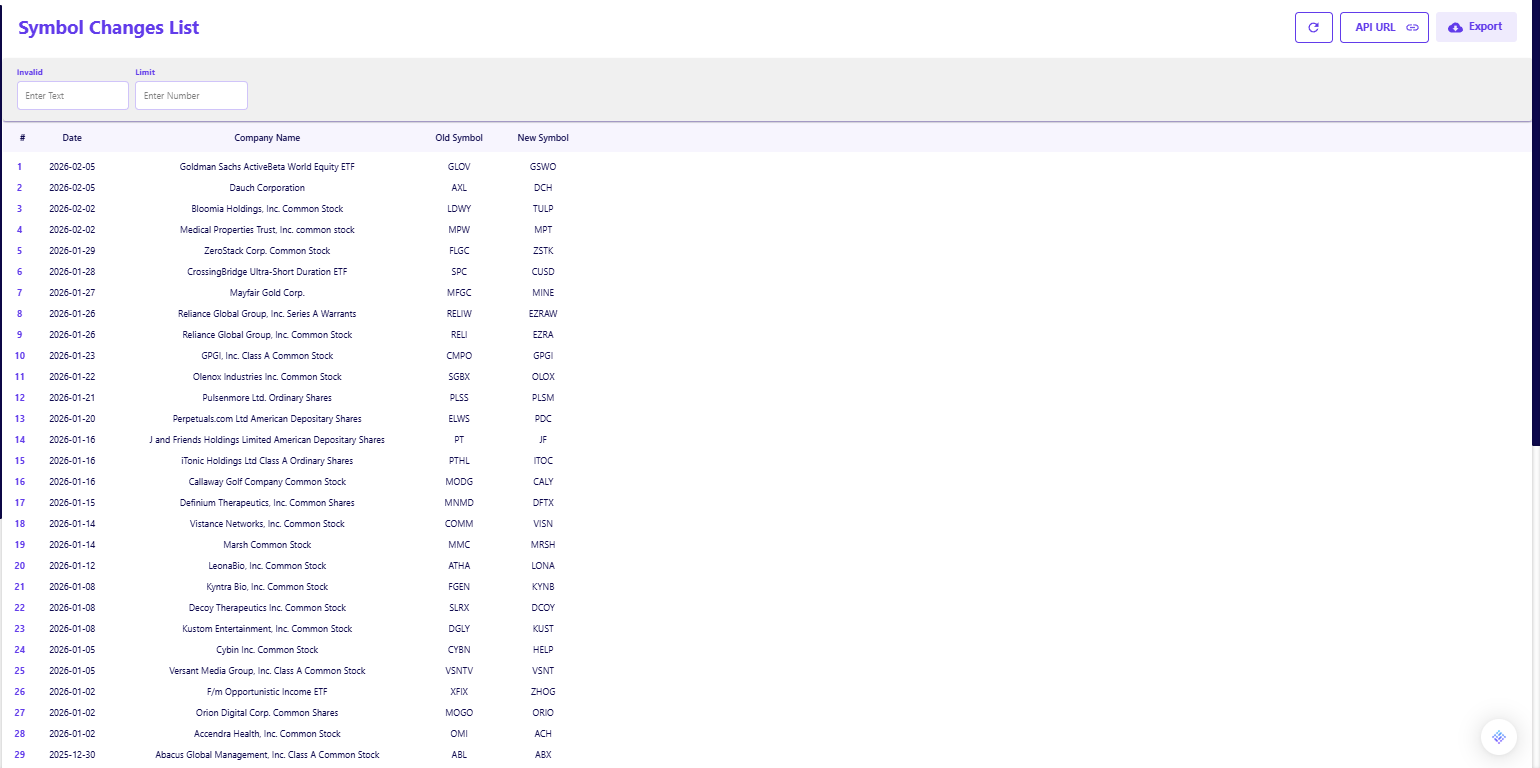
Validating the Data
Trusting an automated feed requires verification. In a self-serve environment, the easiest way to validate this API is to look for a known, recent corporate action.
You can run a simple check by querying the list and searching for a specific company you know has recently rebranded or merged. Seeing a familiar change, like a SPAC merger converting from its shell ticker to its operating ticker, confirms that the feed is capturing the corporate actions relevant to your portfolio.
This simple validation step proves that the API is active and can be relied upon to catch the "edge cases" that usually break static Excel models.
Integrating Symbol Tracking into Your Workflow
The goal of this data is to make your primary analysis more robust. You do not need to build a dedicated application to benefit from this feed; it fits naturally into existing maintenance routines.
For Portfolio Management
If you manage a long-term portfolio, you can use this API to run a monthly audit of your holdings. By comparing your internal list of tickers against the API's change log, you can identify why certain assets may have stopped updating in your dashboard. This ensures your performance reporting reflects the correct and current symbols. For more on maintaining data accuracy in portfolios, you might find our guide on how to analyze executive compensation useful, as leadership changes often precede rebranding events.
For Algorithmic Trading
For developers, this endpoint is a critical "nightly job." Before your trading algorithms run for the day, a script should check for any symbol changes that occurred overnight. This prevents your system from placing orders on invalid tickers or failing to exit positions because the symbol it recognizes no longer exists. This type of data hygiene is a foundational part of gaining a trading edge and mastering calendar data.
Preventing Data Decay
Tracking symbol changes is not about generating alpha directly; it is about preventing the decay of your data infrastructure. By using a free API to automate this maintenance, you ensure that your historical datasets remain accurate and your trading execution remains error-free.
This low-risk integration solves a specific, recurring headache for analysts. Once you have standardized your ticker maintenance, you can focus on more complex tasks, such as deciding which Financial Modeling Prep data you should start with to deepen your analysis.
Frequently Asked Questions
How do I sign up for the free API?
To sign up, visit the documentation page, scroll down to the sign-up box, and insert your email address. No credit card is required.
Is the free plan really free forever?
Yes, the free plan is designed for personal use and allows for 250 requests per day. This gives you ample room to explore endpoints without an expiration date.
Do I need a credit card to get an API key?
No, the free tier is accessible without any payment information. You only need to provide a credit card if you decide to upgrade to a premium plan for higher rate limits or additional datasets.
Is this API available on the free plan?
Yes, the Stock Symbol Changes API is accessible via the free tier, allowing you to monitor recent changes without a paid subscription.
How far back does the data go?
The API provides a comprehensive history of symbol changes, allowing you to reconstruct the timeline of tickers that may have changed years ago.
Does this API track delisted companies?
This specific endpoint focuses on symbol changes (renames). For companies that have been removed from the exchange entirely without a replacement symbol, you would typically look at a specific delisted companies endpoint.
How often should I check for changes?
For active trading systems, it is recommended to check daily, typically before the market opens. For long-term analysis, a weekly or monthly check is usually sufficient.
What causes a symbol change?
Common reasons include mergers and acquisitions (M&A), corporate rebranding (name changes), stock splits, or moving from one exchange to another.
Can I filter the results by date?
Yes, the API allows you to pull the entire list or handle the data programmatically to filter for changes occurring within a specific window relevant to your analysis.
Does this cover global exchanges?
The coverage includes major exchanges. However, ticker conventions can vary significantly by region, so it is always best to cross-reference the Company Name when dealing with international assets.

How to Pull Clean Company Profiles Using a Free API
Accurate financial work starts with correct company identification. If a ticker is mismapped, a currency is assumed inco...
How to Pull Clean Historical Stock Price Data Using a Free API
Building a reliable backtest or market dashboard requires more than just the current price. You need a clean, consistent...